W2-D3: Model Serving — Đưa Pipeline Lên Production
Table of Contents
- Model Serving — Đưa Pipeline Lên Production
- Mở đầu: từ notebook → service
- 1. Framework — FastAPI vs Flask vs BentoML
- 2. Endpoint cơ bản
- 3. Topology — service graph là input, không phải static asset
- 4. Chain 3 Layer Lại
- 5. Latency Budget
- 6. Concurrency
- 7. Health Check + Readiness
- 8. Versioning + Rollback
- 9. Self-Monitoring
- 10. Testing (optional, nâng điểm)
- 11. Deploy Local — Make it run
- 12. Industry landscape — serving frameworks
- 13. Bài tập — Code serve.py + DESIGN.md
- 14. EOD Checkpoint
- 15. Tài liệu tham khảo
Model Serving — Đưa Pipeline Lên Production
Mở đầu: từ notebook → service
Bạn đã có 2 module chạy được trong notebook: 1 cái gom alert thành cluster, 1 cái tìm root cause. Notebook không phải production.
Hôm nay biến nó thành API service — 1 hệ thống monitoring có thể POST batch alert vào và nhận lại incident report.
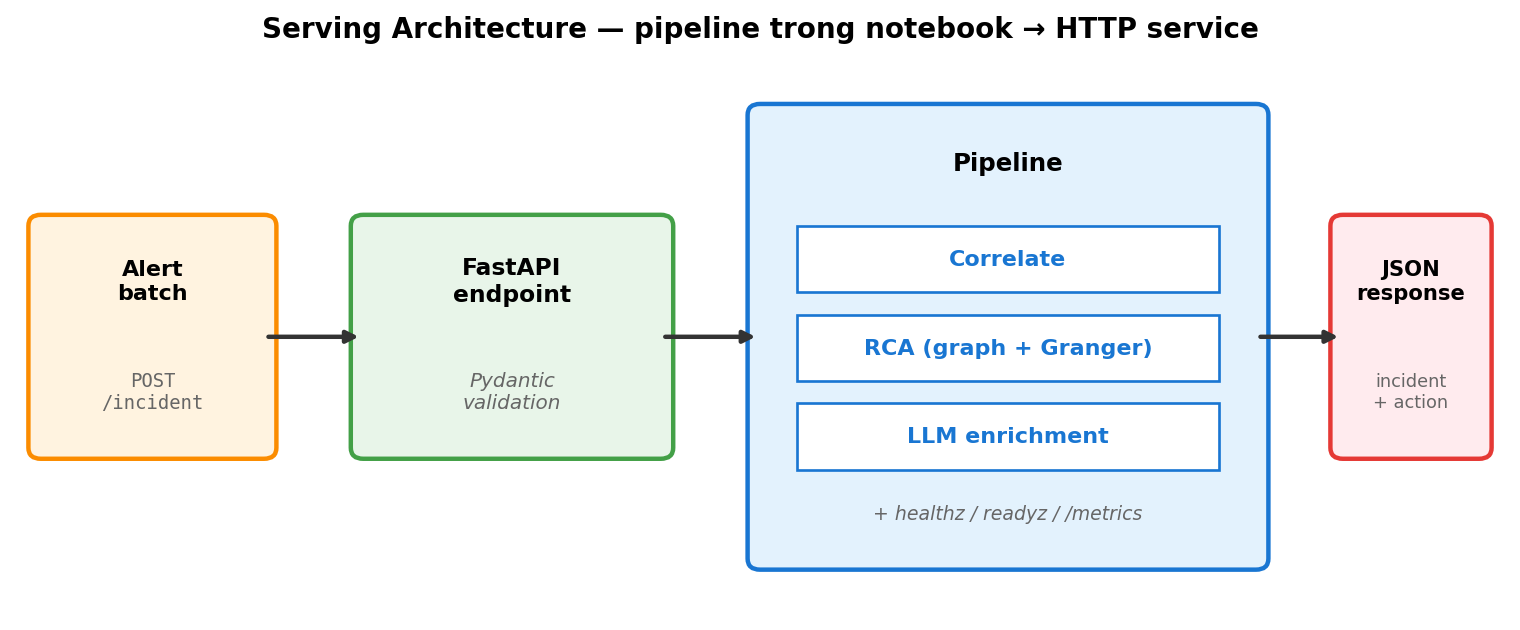
Khi nói “serving” trong AIOps, không chỉ là serve ML model — nó là serve toàn bộ pipeline (correlation + RCA + LLM call) như 1 unit có:
- HTTP endpoint
- Latency budget (p99 ≤ 10s)
- Health check
- Versioning + rollback
- Self-monitoring
Cuối ngày bạn có serve.py chạy được — pipeline trong notebook trở thành HTTP service nhận request từ ngoài.
💡 Quy tắc vàng: Code trong notebook khác code production ở 3 thứ — concurrency, failure handling, observability. Đừng đợi production mới nghĩ về 3 thứ này.
1. Framework — FastAPI vs Flask vs BentoML
3 framework phổ biến cho Python serving:
| Framework | Khi nào dùng | Ưu | Nhược |
|---|---|---|---|
| Flask | Quick prototype | Simple, ít magic | Sync only, không validate input native |
| FastAPI ⭐ | Production API, mixed workload | Async, Pydantic validation, OpenAPI auto, type hints | Magic hơn Flask một chút |
| BentoML | ML model–centric | Model versioning, batching native, Yatai deploy | Học curve cao, overhead cho non-ML workload |
Trong setup này dùng FastAPI. Lý do: pipeline có LLM call (IO-bound → hưởng async), input có schema (Pydantic dễ), test bằng curl/requests (OpenAPI auto-document).
uv pip install fastapi uvicorn pydantic
2. Endpoint cơ bản
2.1 Skeleton — các thành phần cần thiết
serve.py khởi tạo FastAPI app + 2 schema (Pydantic):
- Input schema
IncidentRequest— listAlert, mỗi alert có 8 field (id,ts,service,metric,severity,value,threshold,labels). - Output schema
IncidentResponse—clusterslist,root_causeobject,recommended_actionslist,similar_incidentslist.
2 endpoint:
GET /healthz— return{"status": "ok"}. Không validate gì, chỉ để load balancer biết process còn sống.POST /incident— nhậnIncidentRequest, gọi pipeline, trảIncidentResponse. Nếualertsrỗng → raiseHTTPException(400).
Chạy với uvicorn serve:app --port 8000 --reload. Test bằng curl localhost:8000/healthz và curl -X POST -d '{...}' với JSON payload.
Đọc thêm: FastAPI tutorial · Pydantic models.
2.2 Pydantic validation — không phải optional
Khi định nghĩa schema bằng BaseModel, Pydantic tự kiểm tra mọi field lúc request đến. Thiếu field bắt buộc, sai type, hoặc value ngoài range → tự động return 422 Unprocessable Entity với detail chỉ rõ field nào sai. Không cần code validation.
Đây là khác biệt lớn với Flask: trong Flask, validation phải tự viết bằng request.json + if/else, dễ miss case. Đảm bảo endpoint không bao giờ trả 500 khi input sai — luôn 400/422 với message cụ thể.
3. Topology — service graph là input, không phải static asset
Pipeline correlation + RCA của bạn xài service graph như 1 input. Trong notebook bạn load services.json tay — nhưng trên production, graph là data có lifecycle: được sinh ra từ đâu đó, có thể stale, có version, scale lên-xuống.
3.1 4 source sinh service graph
| Source | Cách hoạt động | Mạnh | Yếu |
|---|---|---|---|
| Distributed tracing (OpenTelemetry / Jaeger / Tempo) | Span có service.name + parent/child. Aggregate spans qua N phút → edge weight | Auto-discover, real-time, weight theo traffic thật | Cần instrument app, sampling rate ảnh hưởng accuracy |
| Service mesh (Istio / Linkerd) | Sidecar proxy log mọi request L7 → metric istio_requests_total có src + dst | Không cần code thay đổi, 100% coverage traffic qua mesh | Chỉ thấy L7, miss raw TCP |
| Manual / IaC | Tay điền services.json, OpenAPI specs, k8s NetworkPolicy | Source-of-truth khi mới có 5-20 service | Drift nhanh — 1 tuần là sai |
| Code analysis | Static AST parse HTTP/gRPC client init, hoặc eBPF capture syscall | Bắt được rare path không có trong traffic mẫu | Tooling phức tạp, false positive cao |
Trong setup này dùng “Manual” — đơn giản nhất cho ≤ 20 service. Lên 100+ service phải chuyển sang tracing/mesh.
3.2 Graph freshness — silent failure khi stale
Code load services.json 1 lần lúc start. 1 tuần sau team deploy service mới — code không reload, topology correlation lệch.
Triệu chứng: service mới luôn đứng riêng cluster, không gom được dù đang trong cascade. On-call thấy cluster size bất thường nhỏ → debug pipeline → mới phát hiện graph stale.
2 cách giải:
- Reload mỗi N phút (đơn giản): worker thread reload mỗi 5 phút. Latency tối đa 5 phút stale.
- Subscribe event (zero lag): service registry phát event khi có thay đổi, code subscribe + reload ngay. Phức tạp hơn.
Cho production thực tế: chọn cách 1, document trade-off trong design doc.
3.3 Graph như 1 “model” — version + rollback
Mỗi version graph cho output correlation khác nhau. Khi cluster ratio đột nhiên kém — có thể là code regress, có thể là graph mới gây regress. Cần biết đang dùng graph nào.
Endpoint /version nên trả graph_version + graph_loaded_at + graph_source:
GET /version
{
  "app": "1.2.0",
  "graph_version": "g-2026060801",
  "graph_loaded_at": "2026-06-08T03:14:22Z",
  "graph_source": "otel-tempo",
  "graph_node_count": 87,
  "graph_edge_count": 142
}
Khi correlation regress, kiểm tra graph_version trước khi đổ tại code. Rollback graph là 1 cách giải — khác hoàn toàn rollback code.
3.4 Scale — 9 service vs 1000 service
Setup mẫu có 9 service. Production có 100-1000+. Một số phép tính scale:
| Operation | Cost ở 9 service | Cost ở 1000 service | OK không? |
|---|---|---|---|
| PageRank trên reverse subgraph | < 1ms | ~50ms | OK, vẫn dùng được |
| All-pairs shortest path | < 1ms | O(V³) ≈ 1s | KHÔNG ổn, phải cache hoặc index |
| Subgraph extraction (filter alerting service) | < 1ms | ~10ms | OK |
| Community detection (Louvain) | < 1ms | ~200ms | OK nếu chạy offline mỗi N phút |
Bottleneck thường thấy ở scale lớn: cardinality của cluster_id label trong Prometheus metric — nếu mỗi alert tạo cluster_id unique, TSDB explode (xem cardinality explosion). Solution: stable cluster_id (hash của fingerprint set, không phải timestamp).
4. Chain 3 Layer Lại
Glue layer (file pipeline.py) ráp 3 module lại theo flow:
Khởi tạo (module-level, chạy 1 lần khi import):
- Load service graph từ
dataset/services.json(kết quả: 1networkx.DiGraph). - Load incident history từ
dataset/incidents_history.json(kết quả: list dict). - Cache cả 2 vào biến module-level
GRAPH,HISTORY— không reload mỗi request.
process_batch(alerts) flow:
- Gọi
correlate(alerts, GRAPH, gap_sec=120, max_hop=2)từ Layer 1 → list cluster. - Nếu rỗng → return early với
root_cause = "unknown". - Pick cluster lớn nhất (theo
alert_count) làm primary incident. - Gọi
run_rca(primary, alerts, GRAPH, HISTORY)từ Layer 2 → dict vớiroot_cause,confidence,actions,similar_incidents. - Pack lại thành dict matching
IncidentResponseschema → return.
Endpoint /incident wrap pipeline:
- Convert Pydantic models → dict bằng
model_dump()(vì pipeline làm việc với plain dict, không phụ thuộc FastAPI). - Try/except quanh
process_batch— nếu exception, log full traceback (exc_info=True) và raiseHTTPException(500)với message ngắn cho client. Không bao giờ leak stack trace ra ngoài.
5. Latency Budget
5.1 Đo trước, optimize sau
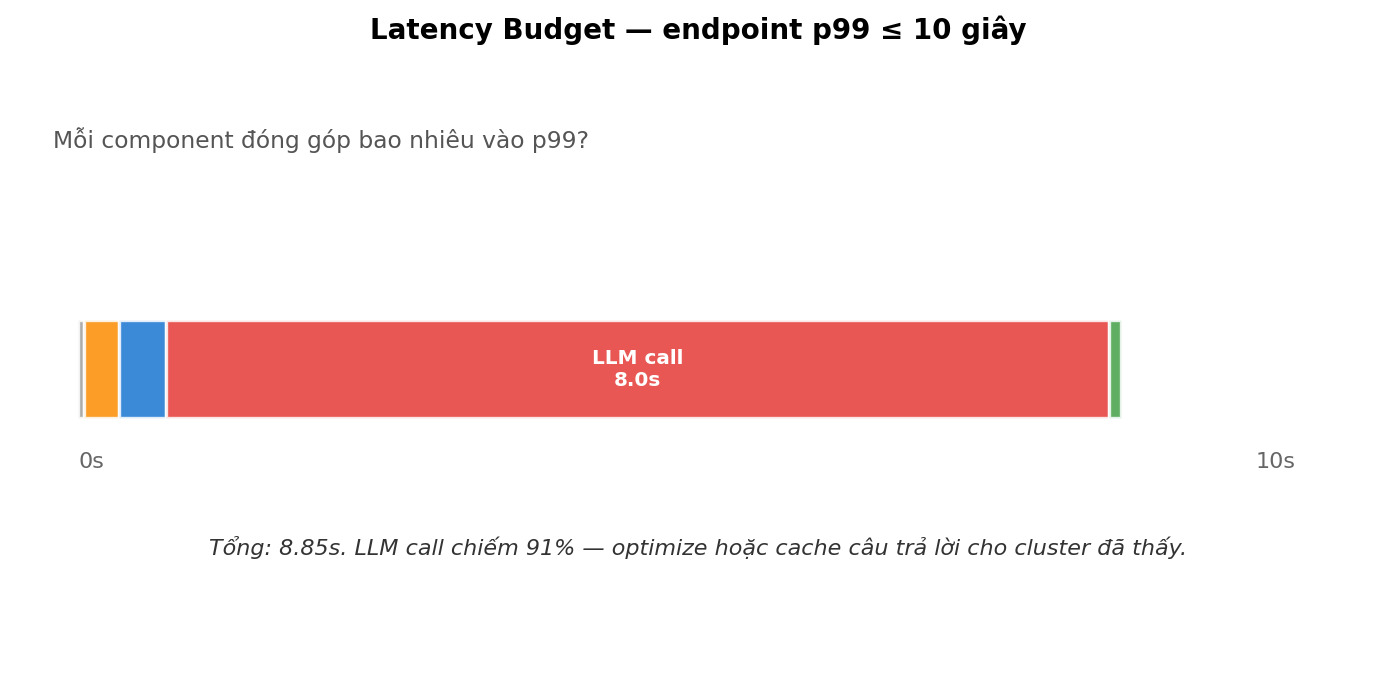
Trước khi optimize, phải đo. Add 1 FastAPI middleware tính time.perf_counter() quanh call_next(request), đính kết quả vào response header X-Response-Time-Ms, đồng thời log structured {method} {path} {status} {duration_ms}. Middleware này chỉ ~10 dòng code nhưng cho bạn data thật để biết bottleneck ở đâu.
Sau khi có data, nhìn breakdown: thông thường LLM call dominate tổng latency (~91%). Tối ưu 100ms ở các layer khác = 1% improvement. Tối ưu LLM = big win. Đừng bắt đầu optimize trước khi đo.
5.2 Optimization cho LLM call — 4 cách
| Kỹ thuật | Cách làm | Khi nào hiệu quả |
|---|---|---|
| Cache | Hash prompt → SHA256 → key. Lookup cachetools.TTLCache (maxsize=1000, ttl=3600). Miss thì gọi LLM thật và lưu. | Same incident pattern lặp lại — production thường có 20-30% cache hit. |
| Async + concurrent | Khai báo endpoint async def, dùng asyncio.gather để gọi N LLM call song song thay vì tuần tự. | Khi 1 request cần enrich nhiều cluster (vd: 3 cluster trong 1 batch). |
| Smaller model | Thay gpt-4o bằng gpt-4o-mini hoặc claude-haiku-4-5. | RCA là task structured (JSON output), không cần model lớn. 5× rẻ + 2× nhanh. |
| Skip LLM | Nếu graph RCA confidence ≥ 0.9, skip LLM call hoàn toàn — trust graph output. | 60-70% incident “rõ ràng” không cần enrichment. |
Combine cả 4 → giảm 90% LLM cost mà output quality gần như không đổi.
5.3 Timeout — phải có
Mọi outbound network call phải có timeout. Với OpenAI SDK: OpenAI(timeout=10.0, max_retries=2). Với requests: requests.post(url, timeout=(3, 10)) (connect=3s, read=10s).
Không timeout → 1 LLM call hang → endpoint hang forever → connection pool cạn → toàn bộ service stuck. Đây là failure mode phổ biến nhất khi gọi external API.
6. Concurrency
6.1 1 worker vs N worker
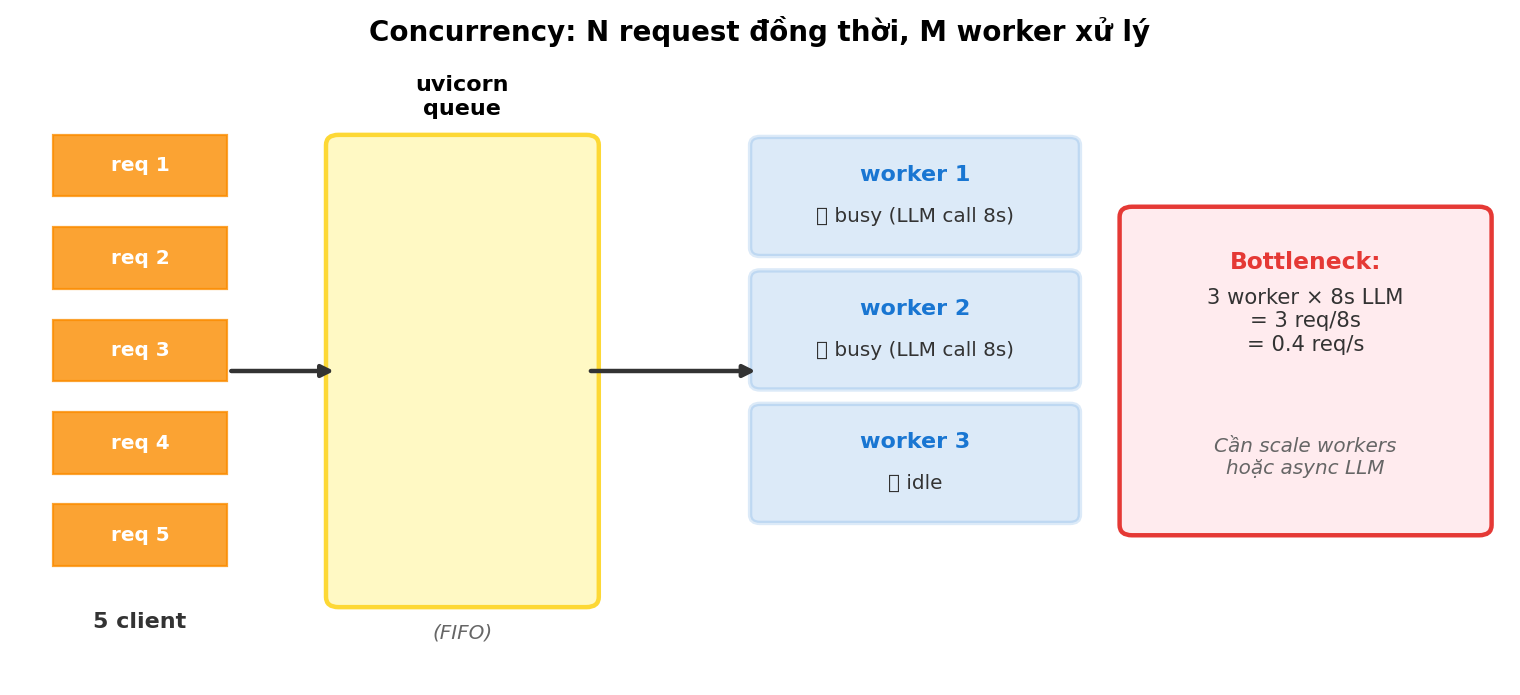
Default uvicorn serve:app chạy 1 worker = 1 process xử lý request tuần tự (sync code) hoặc concurrent với event loop (async code).
Scale cho production:
uvicorn serve:app --host 0.0.0.0 --port 8000 --workers 4
4 worker → request load-balance round-robin. Trade-off: nhiều worker = nhiều memory (mỗi process duplicate state).
6.2 Race condition với shared state
Nếu pipeline có in-memory cache + nhiều worker → mỗi worker có copy riêng → cache không cross-worker.
Solution: stateless — mỗi request load state từ Redis / DB. Hoặc giữ stateless (chấp nhận limitation, document trong DESIGN.md).
Chấp nhận stateless / single-worker. Quan trọng là biết trade-off, không phải implement perfect.
6.3 Concurrent test — verify trước deploy
Dùng ab (Apache Bench) hoặc wrk để bắn N request đồng thời. Vd: ab -n 100 -c 10 -p alerts.json http://localhost:8000/incident = 100 request tổng, 10 concurrent.
Theo dõi 2 metric: p99 latency và error rate. Nếu p99 vượt 30 giây hoặc error rate > 1% → bottleneck thật, cần fix trước khi đưa lên môi trường thật.
7. Health Check + Readiness
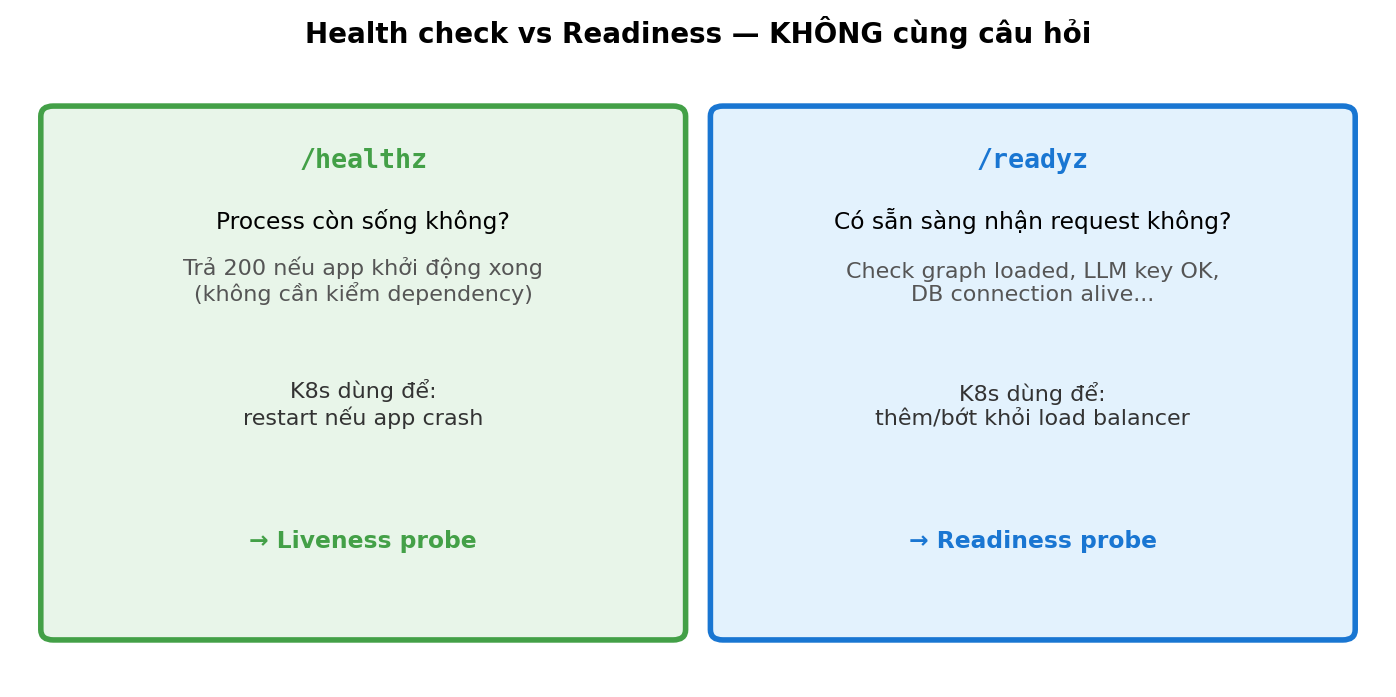
/healthz từ §2 đủ cho liveness (process còn sống). Cho readiness (sẵn sàng nhận request thật), thêm endpoint /readyz check downstream dependency:
graph—GRAPH.number_of_nodes() > 0(service graph đã load xong).history—len(HISTORY) > 0(incident history đã load).llm(optional) — callmodels.list()với timeout 2s. Cẩn thận: readiness không nên depend external service quá chặt — nếu OpenAI down, có muốn pod bị mark not-ready không?
Nếu bất kỳ check fail → raise HTTPException(503, detail=checks). Kubernetes (hoặc load balancer) sẽ remove pod khỏi rotation. Đọc thêm: Kubernetes probes.
8. Versioning + Rollback
8.1 Version trong response
Endpoint /version trả về app version + pipeline_config (gap_sec, max_hop, rca_method, llm_model). Khi correlation/RCA bị regress, kiểm tra /version của môi trường đang chạy trước khi đổ tại code. Nhiều khi config thay đổi (vd: ai đó override gap_sec qua env var) chứ không phải code.
8.2 Feature flag cho LLM — kill switch khi cần
Dùng env var AIOPS_USE_LLM (default true) wrap quanh run_rca. Khi flag false → bypass LLM, dùng graph-only output với method = "graph-only-flag-off".
Use case thật: LLM provider (OpenAI / Anthropic) bị outage giữa giờ peak. Bạn không muốn endpoint hang vì LLM timeout — set AIOPS_USE_LLM=false, restart pod, endpoint chạy lại trong 30 giây với graph-only quality. Không cần redeploy code. Đọc thêm: Martin Fowler — Feature Toggles.
8.3 Shadow deployment
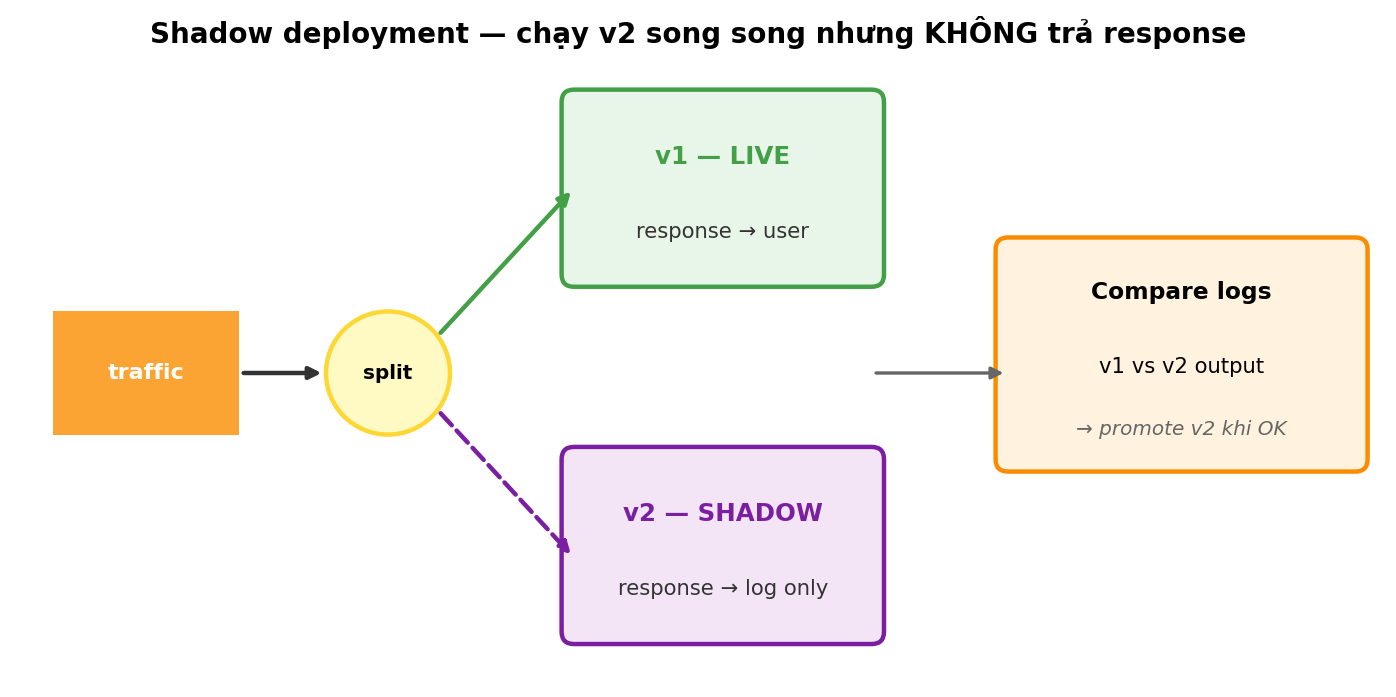
Production AIOps: deploy v2 cùng v1, nhưng v2 không serve traffic — nó shadow v1 (nhận cùng input, log output). So sánh v2 output với v1 output trên data thật. Nếu OK trong 1 tuần → promote v2.
Out of scope cho phạm vi này. Đề cập để biết direction khi scale lên production thật.
9. Self-Monitoring
Pipeline AIOps monitor production — nhưng bản thân nó cũng cần monitor.
9.1 Metric Prometheus
Dùng prometheus-client định nghĩa 4 metric core:
aiops_incident_requests_total(Counter, labelstatus= success/error) — đếm request.aiops_incident_latency_seconds(Histogram) — phân phối latency từng request.aiops_llm_failures_total(Counter, labelreason) — đếm LLM call fail và phân loại (timeout / 5xx / parse_error).aiops_clusters_per_request(Histogram) — phân phối số cluster output mỗi request. Spike bất thường = cluster algorithm có vấn đề.
Mount /metrics endpoint bằng app.mount('/metrics', make_asgi_app()). Trong endpoint chính, dùng context manager with REQUEST_LATENCY.time(): để auto-track + try/except để inc counter status. Prometheus server scrape /metrics mỗi 15-30 giây.
9.2 Key SLO cho AIOps pipeline
| SLO | Target | Vì sao |
|---|---|---|
| Availability | 99.5% | Pipeline down → không có incident triage |
| p99 latency | < 10s | SRE chờ < 10s |
| LLM failure rate | < 1% | Cao hơn → nghi vấn provider issue |
| Root-cause precision (offline) | > 70% top-3 | Thấp hơn → pipeline tạo noise thay vì help |
9.3 Logging — JSON, không print
Tự viết JsonFormatter extends logging.Formatter — override format() trả về json.dumps({ts, level, msg, logger, ...extra}). Set handler dùng formatter này.
Khi log, pass structured data qua extra=:
logger.info('Processed incident', extra={'extra': {
    'cluster_count': 3, 'root_cause': 'payment-svc', 'confidence': 0.84,
}})
Output là JSON line — dễ ship vào ELK / Loki và query kiểu cluster_count > 5 AND confidence < 0.5 thay vì grep text. Đọc thêm: 12-factor logs.
10. Testing (optional, nâng điểm)
10.1 Unit test — pure function
Test các function pure (không phụ thuộc network). Vd: fingerprint(alert) phải EXCLUDE timestamp và value — verify bằng 2 alert chỉ khác ts và value mà fingerprint giống nhau.
10.2 Integration test — endpoint
Dùng fastapi.testclient.TestClient(app). 3 test cơ bản:
GET /healthz→ 200 +{"status":"ok"}.POST /incidentvới{"alerts": []}→ 400 (empty rejected).POST /incidentvới 1 alert valid → 200, response có fieldclusters,root_cause,recommended_actions.
10.3 Mock LLM trong test
Dùng unittest.mock.patch decorator quanh function call_llm_rca. Test set mock.return_value = dict cố định, pipeline chạy với output đó. Tránh test phụ thuộc LLM API thật (chậm + tốn tiền + flaky).
Mock LLM trong test OK. Mock LLM trong endpoint production = không acceptable — đó là khác biệt cốt lõi giữa test env và production env.
11. Deploy Local — Make it run
11.1 requirements.txt
fastapi>=0.110
uvicorn[standard]>=0.27
pydantic>=2.5
networkx>=3.2
pandas>=2.0
openai>=1.10
prometheus-client>=0.19
pytest>=7.4
11.2 Makefile (nâng điểm “project running”)
.PHONY: install run test clean

install:
	uv pip install -r requirements.txt

run:
	uvicorn serve:app --host 0.0.0.0 --port 8000 --reload

run-prod:
	uvicorn serve:app --host 0.0.0.0 --port 8000 --workers 4 --no-access-log

test:
	pytest -v tests/

clean:
	find . -name "__pycache__" -exec rm -rf {} +
	rm -f rca_llm_trace.log
11.3 Dockerfile (bonus)
FROM python:3.11-slim

WORKDIR /app
COPY requirements.txt .
RUN pip install --no-cache-dir -r requirements.txt

COPY . .
EXPOSE 8000

CMD ["uvicorn", "serve:app", "--host", "0.0.0.0", "--port", "8000", "--workers", "2"]
Không bắt buộc. Có Dockerfile + chạy được → notable.
12. Industry landscape — serving frameworks
Đây là một số framework serving phổ biến trong industry. Mỗi cái có triết lý riêng — không có cái nào “đúng nhất”:
| Framework | Triết lý cốt lõi | Mạnh ở đâu |
|---|---|---|
| FastAPI (đang dùng) | Web framework chung, không assume ML — bring your own pipeline | Linh hoạt, async native, validate input bằng Pydantic; cộng đồng web Python lớn |
| BentoML | Model-centric — wrap model thành “bento”, deploy đồng nhất nhiều môi trường | Model versioning, auto-batching, Yatai (k8s operator); tốt khi pipeline chính là ML model |
| Ray Serve | Phân tán workload qua nhiều node trong Ray cluster — composition là first-class | Multi-model pipeline, autoscale theo request, tích hợp Ray for distributed compute |
| KServe | Kubernetes-native, model serving qua CRD InferenceService | Production scale trên k8s, canary rollout, autoscaling tới zero |
| MLflow Serving | Serve model đã track trong MLflow registry — flow “track → register → serve” liền mạch | Tốt khi team đã xài MLflow cho experiment tracking |
| AWS SageMaker Endpoint | Managed endpoint trên AWS — không tự quản infrastructure | Production-grade ngay, autoscale, monitoring built-in; vendor lock-in |
| NVIDIA Triton | Optimize cho GPU inference — multi-framework (PyTorch, TF, ONNX, TensorRT) | Inference latency thấp nhất, batch dynamic, GPU memory management |
| LangServe | LangChain chain → HTTP endpoint trong 1 dòng code | Nhanh prototype LLM chain; thiếu observability deep |
Pipeline bạn xây hôm nay gần với FastAPI standalone nhất — viết tay app, tự handle concurrency, observability. Khi pipeline lớn dần và team scale ra, có thể migrate sang BentoML (nếu ML-heavy), Ray Serve (nếu cần distributed compute), hoặc KServe (nếu đã on k8s).
Đọc thêm:
- Comparison of model serving frameworks — Neptune.ai
- Ray Serve vs FastAPI vs BentoML
- Building serving infrastructure at Uber
13. Bài tập — Code serve.py + DESIGN.md
💻 Máy yếu vẫn chạy được: dùng
--workers 1(single process). SetAIOPS_USE_LLM=falseđể bypass LLM call khi benchmark concurrency. Toàn bộ dependency (fastapi,uvicorn,pydantic,networkx,cachetools,prometheus-client) tổng ~50 MB, RAM idle ~150 MB, OK với máy 4 GB.
Quy ước nộp bài:
- Branch
main- Path:
aiops-<tên>/w2/d3/(lowercasew2+d3)- File:
serve.py+DESIGN.md(HOA) +SUBMIT.md(HOA)- Tên file đúng như trên — KHÔNG phải
app.py,architecture.md, hayadr_001.md. Pipeline downstream parse output dựa trên tên file.
13.1 Steps
- Tạo
aiops-<tên>/w2/d3/ - Build skeleton
serve.pytheo §2-3 - Add
/healthz+/readyzendpoint (§6) - Add latency middleware (§4.1)
- Wire với
correlatefunction từaiops-<tên>/w2/d1/vàrun_rcatừaiops-<tên>/w2/d2/. Pipeline phải end-to-end thật — endpoint chạy real alerts qua real correlate + real RCA. - Write
DESIGN.md≥ 100 từ:- Pipeline architecture trong endpoint
- Latency budget breakdown
- 1 production concern (concurrency hoặc fault tolerance) — handle thế nào
- Trade-off: vì sao chọn FastAPI thay vì Flask/BentoML
- Write
SUBMIT.mdvới reflection
13.2 Acceptance
serve.pychạy vớiuvicorn serve:app --port 8000 --workers 1(máy yếu vẫn chạy được)curl /healthztrả{"status":"ok"}curl POST /incidentvới valid input trả 200, body cóclusters,root_cause,recommended_actions- Invalid input → 422, không 500
DESIGN.md≥ 100 từ, có concrete decision (vd: “chọn gap_sec=120s vì…”)
14. EOD Checkpoint
Trong SUBMIT.md, trả lời 3 câu — mỗi câu dựa trên cái bạn ĐÃ measure/observe khi chạy endpoint:
Latency thực của endpoint bạn ra sao? Chạy 20 request liên tiếp với dataset 20 alert thật, đo p50 và p99 từ header
X-Response-Time-Ms. Phase nào (validate / correlate / RCA / LLM / serialize) chiếm phần lớn? Phase nào sẽ scale linear nếu input gấp 10×, phase nào fixed cost?LLM provider down hoặc 4 request đồng thời — endpoint handle ra sao? Test concurrency bằng
ab -n 20 -c 4 -p body.json -T application/json http://localhost:8000/incident(Linux/Mac) hoặc Pythonconcurrent.futures.ThreadPoolExecutor(Windows). Bottleneck đầu tiên bạn quan sát được là gì? Bạn có fallback path không?/healthzvà/readyzcủa bạn check gì? Vì sao tách 2 endpoint thay vì gộp 1? Khi LLM API down,/readyzcủa bạn fail hay vẫn pass? Lý do?
15. Tài liệu tham khảo
- FastAPI: https://fastapi.tiangolo.com/tutorial/ — 5 phần đầu là đủ ngữ cảnh
- Pydantic v2: https://docs.pydantic.dev/latest/concepts/models/
- “Patterns of Distributed Systems” — Unmesh Joshi (Manning). Chapter Health Check + Heartbeat
- Prometheus client Python: https://github.com/prometheus/client_python
uvicorndeployment: https://www.uvicorn.org/deployment/